Tim Hortons App Guide 2026: Rewards, Points, Online Ordering and Delivery
The Tim Hortons app is the easiest way to order at Tims, skip the line, and turn every coffee into points toward free food. In September 2026, Tims rolled out a redesigned version of the app with a new look, a personalized “For You” section and faster reordering, so even long time users are finding their way around it again.
I use the Tims app almost every day, so in this guide I cover everything you need: how to download it, how Tims Rewards works, how many points you need for a free coffee, whether points expire, how the birthday reward works, how to order online for pickup or delivery, and what to do when the app is not working. Rewards rules can change, so check the Tims app for the latest details before you redeem.”
What Can You Do With the Tims App?
The app does four main jobs. You can order ahead for pickup or delivery, pay in the app, collect and redeem Tims Rewards points, and unlock weekly personalized offers. The Scan and Pay feature does the payment and the points in a single scan at the counter or drive thru, which is the fastest way to order at Tims.
The September 2026 redesign kept all of those features and reorganized them. The home screen now has a “For You” area with personalized offers, an “Order Again” button for your recent orders, larger tiles for Order and Rewards, and quick icons for Offers, Delivery, Gift Cards, Payment Methods, the restaurant locator and contests like Roll Up To Win and the NHL Hockey Challenge.
Tims Rewards Points Chart 2026: The Tim Hortons Points Menu
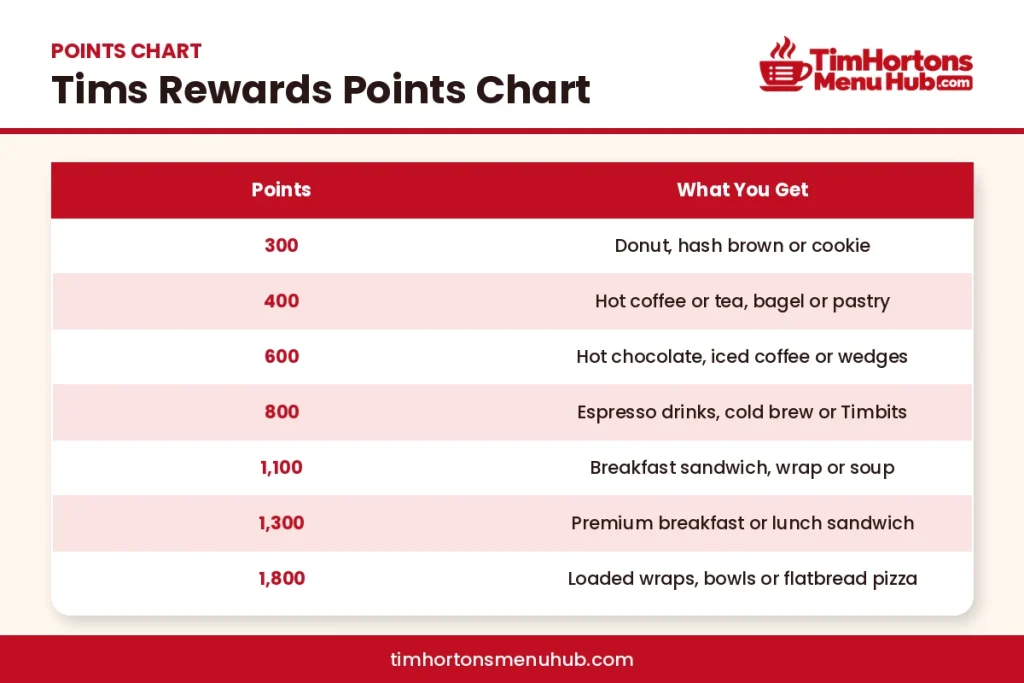
What You Can Get With Tims Points
Tims Rewards uses a simple tier system. You earn points on every purchase and trade them for free items at set point levels. These are the tiers at the time of writing, from the cheapest reward to the biggest.
Points | What You Get |
|---|---|
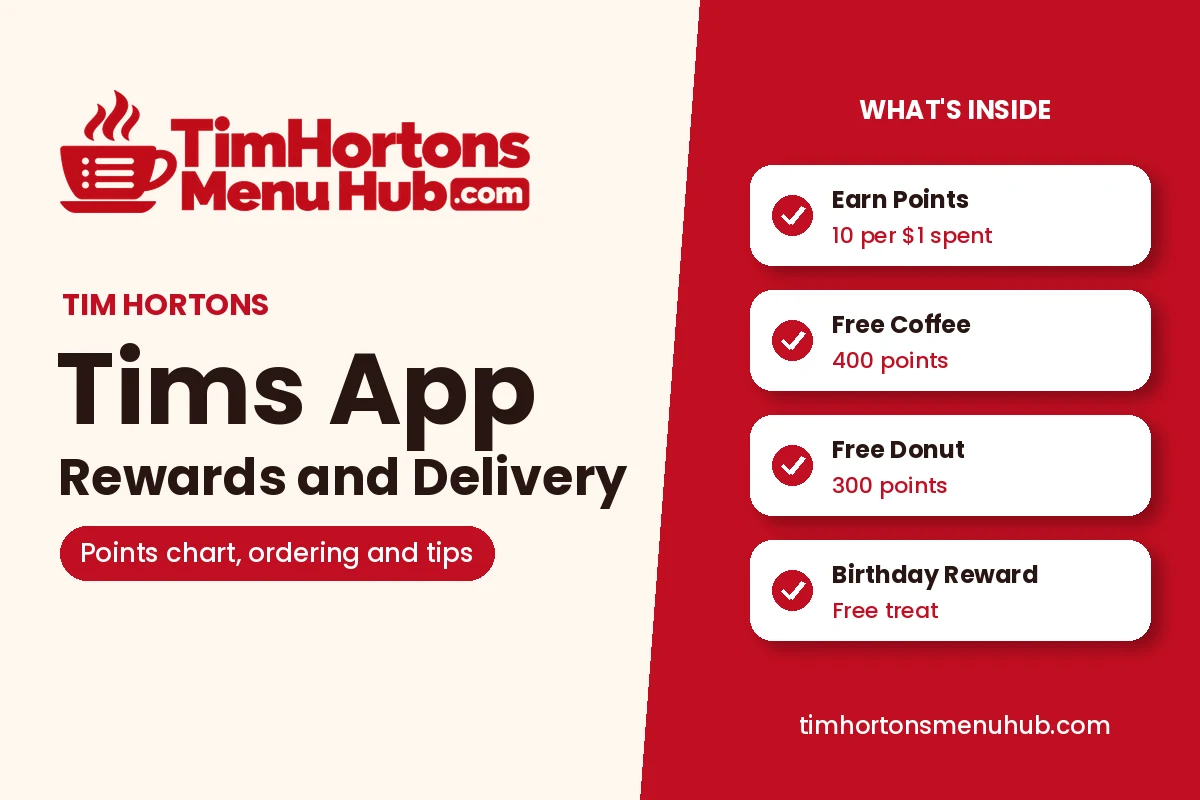
300 Points | A donut, a hash brown or a cookie |
400 Points | A hot coffee or tea in any size, a bagel or a pastry |
600 Points | A hot chocolate, an iced coffee or potato wedges |
800 Points | Espresso drinks like cappuccinos, cold brew or Timbits |
1,100 Points | A breakfast sandwich, a breakfast wrap or soup |
1,300 Points | Premium breakfast items or lunch sandwiches |
1,800 Points | Loaded wraps, bowls or flatbread pizzas |
How You Earn Tims Points

There are a few ways to build up points faster. Here are the basics of earning.
Way to Earn | How It Works |
|---|---|
Every Purchase | 10 points for every $1 you spend before tax |
Scan and Pay | Pay and collect points in one scan at the counter or drive thru |
Bonus Offers and Challenges | Weekly offers in the app add bonus points on selected items |
Birthday Reward | A free birthday treat when your birthday is saved in your account |
How Many Tims Points for a Coffee?

A free hot coffee or tea costs 400 points, and that works for any size, including an extra large. Since you earn 10 points per dollar, you need to spend about $40 before tax to earn a free coffee. A donut or hash brown at 300 points comes even sooner, after about $30 of spending.
My tip: redeem your points on the biggest size or the most expensive item in each tier. A 400 point extra large coffee or a 1,100 point breakfast sandwich gives you more value for the same points than a small coffee.
Tims Rewards Program: How It Works
The Tim Hortons rewards program, called Tims Rewards, is free to join and runs entirely through the app and website. Tims Rewards Canada is separate from the programs in other countries, so your Tims reward points only work at Canadian restaurants. You earn points on almost every purchase, including drive thru, counter, mobile order and delivery orders placed through Tims, as long as you scan your code or order in the app.
Points cannot be shared or combined between accounts, so each person in a household needs their own account. Tims also partners with other programs from time to time; for example, a partnership with Canadian Tire was announced in September 2025 to let members earn across both programs.
How Much Are Tim Hortons Points Worth?
Tim Hortons points value depends on what you redeem them for. Rewards experts put the Tim Hortons rewards points value at roughly half a cent each, with a range of about 0.34 to 0.66 cents per point depending on the item. In practice, the 1000 Tim Hortons points value is about $5 in food and drinks, more if you use them on higher priced items and less on cheap ones.
The best value comes from the bigger items in each tier, like an extra large coffee for 400 points or a premium breakfast sandwich for 1,100 points.
How to Redeem Tim Hortons Points
Tim Hortons points redemption happens in the app. Points can only be redeemed through the app, so the cashier cannot redeem them for you. Here is how to do it:
- Open the Tims app and tap Rewards.
- Choose the reward you want from the points tiers.
- For a counter or drive thru order, add the reward and show your Scan and Pay code. For a mobile order, add the reward to your cart before you check out.
You can usually redeem one reward per transaction, so if you want two free items, place them as separate orders.
Do Tim Hortons Points Expire?
This is one of the most asked questions, whether people search “does Tim Hortons points expire” or “do Tims points expire”, and the answer is yes. Tims Rewards points expire 12 months after the month in which you earned them. For example, points earned in November 2025 expire on December 1, 2026. Unlike some loyalty programs, being active does not reset the clock, so each batch of points has its own expiry date.
The easiest way to avoid losing points is to redeem them regularly, even for a small item like a donut or a coffee, instead of saving up for a big reward.
Tim Hortons Birthday Reward
The Tims birthday reward is one of the nicest Tims Rewards perks: members get a free birthday treat. To make sure you receive it, add your date of birth in your account settings at least seven days before your birthday. The reward then appears in the Rewards section of the app around your birthday. The item has varied over the years, often a donut or a box of Timbits, and you redeem it in the app like any other reward.
How to Order Online at Tim Hortons
Tim Hortons online ordering works through the app or the Tims website, and you can order online at Tim Hortons for pickup or delivery. A Tim Hortons mobile order is the faster choice because the app remembers your restaurant and favourites, which makes ordering at Tim Hortons quicker than waiting in line.
- Open the app and tap Order.
- Pick Pickup or Delivery, then choose your restaurant.
- Add items and customize them, like your milk, sweetness or flavour shots.
- Add any rewards or offers, then pay with a saved card, a Tim Card or another payment method.
- For pickup, go to the counter or drive thru when your order is ready.
Ordering ahead like this is the easiest Tim Hortons pre order option, and it is handy for a big morning order for the office. The “Order Again” button in the new app makes repeat orders one tap.
Does Tim Hortons Do Delivery?
Yes. You can get Tim Hortons delivery through the Tims app or website at participating restaurants, and Tims delivery is also available on third party apps like Uber Eats and DoorDash in many areas. If you use Skip the Dishes, search for your local Tims there too, since third party availability changes by city. Ordering through the Tims app is usually the better option because you earn Tims Rewards points and can use app offers.
Delivery prices are often higher than in store prices, and delivery fees and availability depend on your address. Check the Delivery option in the app to see which restaurants deliver to you.
How to Download Tim Hortons App on iPhone and Android
The app is free. On an iPhone, open the App Store, search “Tim Hortons” and tap Get. On Android, open Google Play, search “Tim Hortons” and tap Install. Make sure you download the official app published by Tim Hortons, then create a Tims Rewards account or sign in with your existing one.
If you live in Canada, use the Canadian version of the Tims app. Tims Rewards accounts are country specific, so points earned in Canada cannot be used at Tims in another country.
Tims Rewards Login and Tim Card Balance
For Tims Rewards login, open the app or go to the Tims website and sign in with the email address linked to your account.
To check your Tim Card balance, use the Gift Cards section of the app or the Tims website. Once a Tim Card is saved in the app, you can reload it and pay with it using Scan and Pay.
What to Do When the Tims App Is Not Working
If the app will not load, freezes or will not accept your order, try these steps in order:
- Close the app completely and open it again.
- Check that you have the latest version in the App Store or Google Play, since older versions can stop working after an update like the September 2026 redesign.
- Restart your phone.
- Log out and log back in.
- Delete and reinstall the app. Your points are saved to your account, not your phone, so they will still be there.
If the problem continues, the Tims help centre in the app has a contact form for support.
Benefits of the Tims App
The biggest benefits are free food from points, weekly offers you cannot get at the counter, skipping the line with mobile order, and faster checkout with Scan and Pay. The app is also where Tims runs contests like Roll Up To Win, which ran from February 23 to March 22 in 2026. If you buy coffee at Tims more than once a week, the app pays for itself in free items within a month or two.
Is There a Seniors Discount at Tim Hortons?
Tims does not list a national seniors discount in its app or on its website. Because restaurants are run by local owners, some may offer their own discounts, so it is worth asking at your nearest Tims. For guaranteed savings, the weekly app offers and Tims Rewards points are open to everyone.
Final Thoughts
The Tim Hortons app is worth having if you visit Tims even a few times a week. Use Scan and Pay on every visit, redeem points before they expire after 12 months, save your birthday to get your free treat, and order ahead to skip the line. For your next order, browse the Tim Hortons coffee menu, the Tim Hortons breakfast menu or the complete Tim Hortons menu. Store and breakfast hours vary by location, so see my Tim Hortons hours guide before you go.
Frequently Asked Questions

Jordan Ellis
Hi, I’m Jordan. I started this site because finding current Tim Hortons prices online was harder than it should be, and most menu pages I came across were years out of date. I check prices against the official Tim Hortons app and website, and I keep every page updated whenever prices, sizes, or items change. If something doesn’t match what you’re seeing at your local store, message me through the contact page, and I’ll look into it.